iblai-profile
/iblai-profile
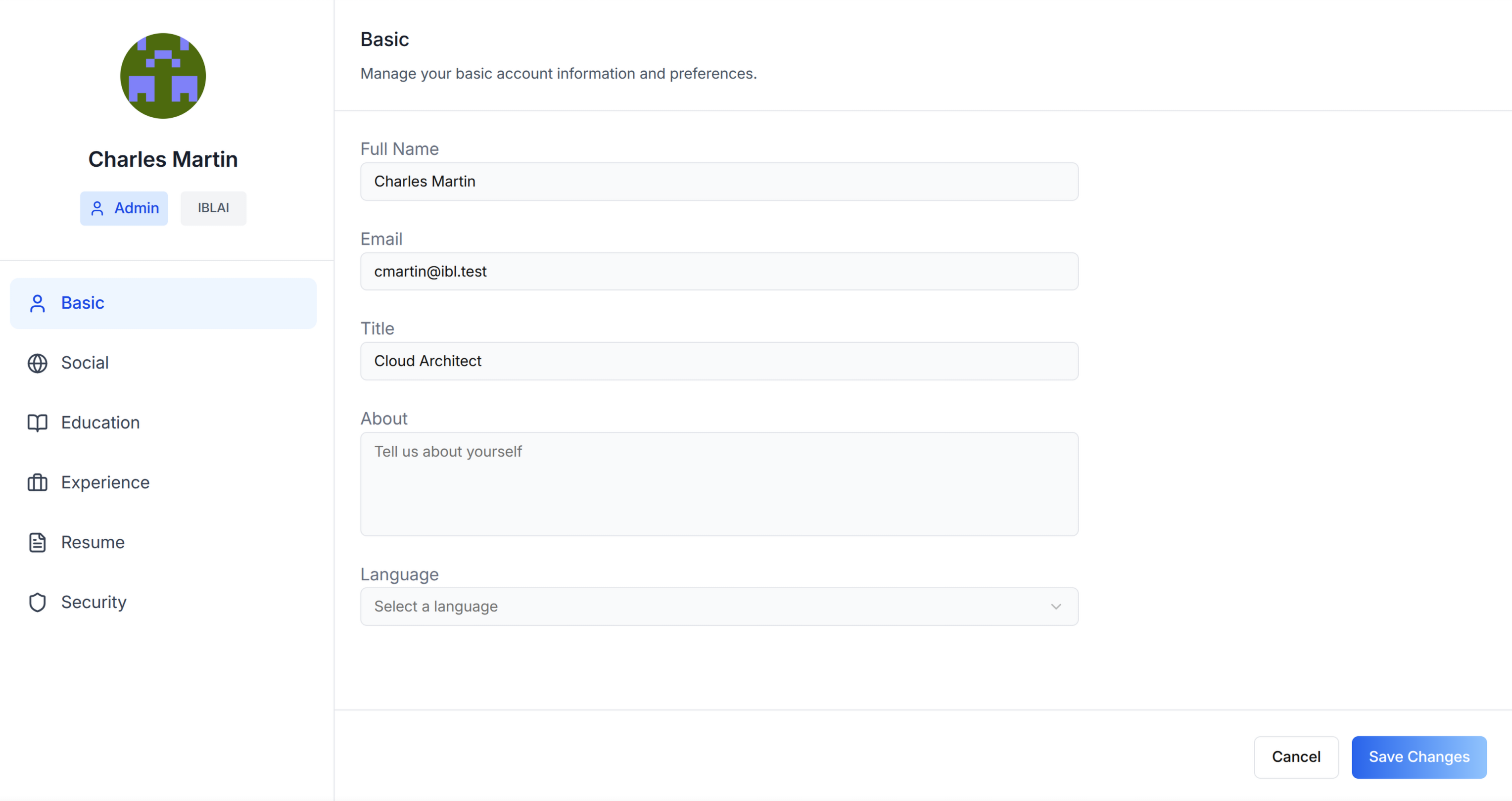
Add user profile features -- a compact avatar dropdown for your navbar and a full settings page with tabs for Basic info, Social links, Education, Experience, Resume, and Security.
AI Assistant: Do NOT add custom styles, colors, or CSS overrides to ibl.ai SDK components. They ship with their own styling. Keep the components as-is. Do NOT implement dark mode unless the user explicitly asks for it.
When building custom UI around SDK components, use the ibl.ai brand:
- Primary:
#0058cc, Gradient:linear-gradient(135deg, #00b0ef, #0058cc)- Button:
bg-gradient-to-r from-[#2563EB] to-[#93C5FD] text-white- Font: System sans-serif stack, Style: shadcn/ui new-york variant
- Use shadcn components for custom UI -- they share the same Tailwind theme and render in ibl.ai brand colors automatically.
You MUST run
/iblai-testbefore telling the user the work is ready.
Prerequisites
- Auth must be set up first (
/iblai-auth) - MCP and skills must be set up:
iblai add mcp
Step 0: Check for CLI Updates
AI Assistant: Before running any
iblaicommand, ensure the CLI is up to date. Runiblai --versionto check the current version, then upgrade directly:
- pip:
pip install --upgrade iblai-app-cli- npm:
npm install -g @iblai/cli@latestThis is safe to run even if already at the latest version.
Step 1: Check Environment
AI Assistant: Before proceeding, check for a
.env.local(or.env) in the project root. Look forPLATFORM,DOMAIN, andTOKENvariables. If the file does not exist or is missing these variables, tell the user: "You need a.env.localwith your platform configuration. Download the template and fill in your values:curl -o .env.local https://raw.githubusercontent.com/iblai/vibe/refs/heads/main/.env.example"
Step 2: Run the Generator
iblai add profile
What Was Generated
| File | Purpose |
|---|---|
components/iblai/profile-dropdown.tsx |
Avatar dropdown for navbar with profile link and logout |
The dropdown reads userData, tenant/current_tenant, and tenants from
localStorage. Admin status is derived from the tenants array by matching
the current tenant key against is_admin.
Step 3: Use MCP Tools for Customization
get_component_info("UserProfileDropdown")
<UserProfileDropdown> Props
The generated dropdown component. Import from @iblai/iblai-js/web-containers/next.
| Prop | Type | Description |
|---|---|---|
username |
string |
Username |
tenantKey |
string |
Tenant/org key |
userIsAdmin |
boolean |
Shows admin badge + settings |
showProfileTab |
boolean |
Show profile link |
showAccountTab |
boolean |
Show account settings link |
showTenantSwitcher |
boolean |
Show tenant switcher |
showLogoutButton |
boolean |
Show logout button |
authURL |
string |
Auth service URL |
onLogout |
() => void |
Logout callback |
className |
string? |
Additional CSS class |
<UserProfileModal> Props (Profile + Account Modal)
For a profile editing modal (used by the MentorAI reference app), import
UserProfileModal from @iblai/iblai-js/web-containers/next. This is a
dialog that combines profile editing and account settings in one overlay.
Required
| Prop | Type | Description |
|---|---|---|
isOpen |
boolean |
Whether the modal is visible |
onClose |
() => void |
Close callback |
params |
{ tenantKey: string; mentorId?: string; isAdmin?: boolean } |
Tenant key, optional mentor ID and admin flag |
authURL |
string |
Auth service URL (from config.authUrl()) |
Optional
| Prop | Type | Description |
|---|---|---|
tenants |
Tenant[] |
Full list of user tenants from localStorage |
targetTab |
string |
Initial tab: basic, social, education, experience, resume, security |
showPlatformName |
boolean |
Show tenant name badge |
useGravatarPicFallback |
boolean |
Use Gravatar when no profile pic |
currentSPA |
string |
Current app identifier (e.g., "agent") |
currentPlatformBaseDomain |
string |
Base domain for custom domain settings |
onTenantUpdate |
(tenant: Tenant) => void |
Called when tenant is updated |
onAccountDeleted |
() => void |
Called after account deletion |
Step 4: Verify
Run /iblai-test before telling the user the work is ready:
npm run build-- must pass with zero errorsnpm run test-- vitest must pass- Start dev server and touch test:
npm run dev & npx playwright screenshot http://localhost:3000/profile /tmp/profile.png
Important Notes
- Redux store: Must include
mentorReducerandmentorMiddleware initializeDataLayer(): 5 args (v1.2+)@reduxjs/toolkit: Deduplicated via webpack aliases innext.config.ts- Admin detection: Derived from
tenantsarray in localStorage - Brand guidelines: BRAND.md