write-passive-swarm-client
Introduction:
Your task is to connect to an external agent and enable dynamic model tuning under the AgentJet reinforcement learning framework, this is very simple.
User --> Application Interface (WEB, TUI, GUI) --> Application Backend --> Fake vLLM (fake_vllm_endpoint.py, you need to write this) --> In fake vLLM, duplicate each request multiple times (on_user_submit_new_requests) --> Calculate relative reward (on_compute_relative_reward) --> Submit reward (swarm_client.end_episode) --> Select the item with highest reward --> Return to user via original path

用户 --> Application界面(WEB, TUI, GUI) --> Application后端 --> 假vLLM(fake_vllm_endpoint.py, 你要写这个) --> 假vLLM中, 将每个请求复制多份(on_user_submit_new_requests) --> 计算相对奖励(on_compute_relative_reward) --> 提交奖励 (swarm_client.end_episode) --> 选取奖励最高的一项 --> 原路返回给用户
First, give the agent system a name based on the user's requirements, always place your code at ``tutorial/opencode_build_***, for example opencode_build_openclaw_agent`.
Next, create the directory:
tutorial/opencode_build_openclaw_agent
Then, create the Agent source files:
tutorial/opencode_build_openclaw_agent/fake_vllm_endpoint.py(Useajet/tuner_lib/experimental/oai_model_one2many.pyas a template. There aren't many changes — the key is to ask the user for the necessary parameters.)tutorial/opencode_build_openclaw_agent/on_compute_relative_reward.py(Placeon_compute_relative_reward.)tutorial/opencode_build_openclaw_agent/on_user_submit_new_requests.py(Placeon_user_submit_new_requests.)
As an optional step, write a tutorial/opencode_build_openclaw_agent/mock_user_request.py to read and iterate the dataset (if any) and simulate user input automatically. For example, if the front application is a web chat app, try to check whether it has a cli to simulate user input.
`mock_user_request.py` --> dataset --> query1 --> Application Interface (WEB, TUI, GUI) --> Application Backend --> Fake vLLM (fake_vllm_endpoint.py, you need to write this) -> .... (same) ....
                                   --> query2 --> Application Interface (WEB, TUI, GUI) --> Application Backend --> Fake vLLM (fake_vllm_endpoint.py, you need to write this) -> .... (same) ....
                                   --> query3 --> Application Interface (WEB, TUI, GUI) --> Application Backend --> Fake vLLM (fake_vllm_endpoint.py, you need to write this) -> .... (same) ....
                                   --> query4 --> Application Interface (WEB, TUI, GUI) --> Application Backend --> Fake vLLM (fake_vllm_endpoint.py, you need to write this) -> .... (same) ....

.... .... ....
Training and Debugging Instructions
Overall, the user first runs ajet-swarm start, then runs agent_roll.py, and training begins. You do not need to and are not allowed to run these bash commands.
- First, help the user write
agent_run.pyandagent_roll.py. - Then, write clear instructions to guide the user through training (
readme.md).
Your task is then complete.
Below are some reference materials. ---
# Using AgentJet Swarm to Train Your Agents
AgentJet Swarm opens infinite possibilities for both LLM Agent engineers and LLM researchers. It is very easy to use and understand. In fact, there is no need for verbose explaination, code explains itself:
## (1/2) Launching a Swarm Server
Simply run `ajet-swarm start` on a GPU server (or GPU cluster master), and we are done ✅. (You may ask: what about training config? Well, config will come from swarm client.)
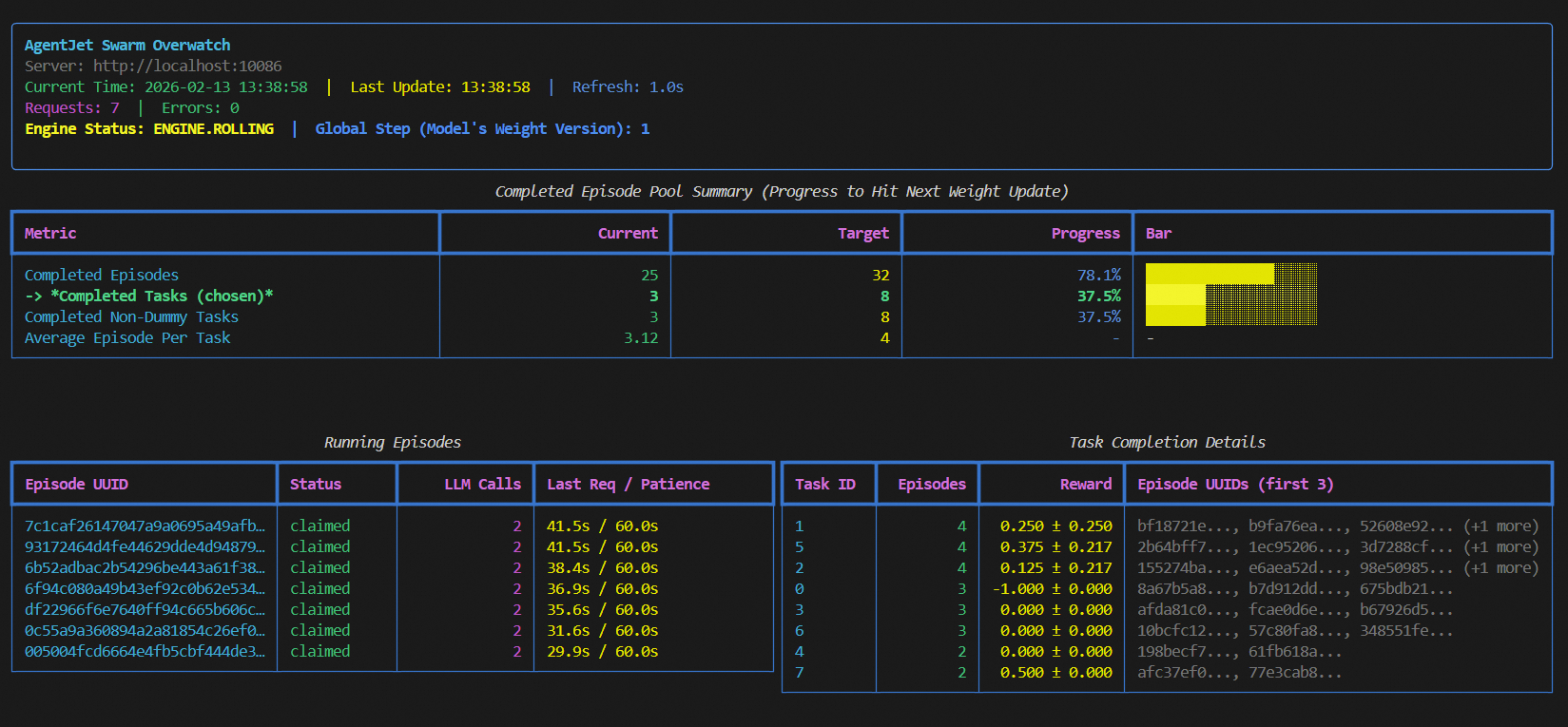
Notes:
1. launch server together with a swarm monitor:
```bash
(ajet-swarm start &> ajet-swarm-server.log) & (ajet-swarm overwatch)
```
2. overwatch swarm status with url:
```bash
ajet-swarm overwatch --swarm-url=http://localhost:10086
```
3. changing customized port (default port is 10086):
```bash
ajet-swarm start --swarm-port=10086
```
4. if you are using a multi-node cluster to train huge models, make sure you have already set up the ray cluster before you hit `ajet-swarm start`.
The swarm server can be in the following states and transition between them as follows:
- **OFFLINE**: The swarm server is started but does not load any models or perform any training. It enters this state directly after startup. Additionally, it transitions to this state upon receiving a `stop_engine` command from (any) client while in any other state.
- **BOOTING**: The swarm server enters this state upon receiving a configuration followed by an explicit `begin_engine` command. In this state, it loads model parameters, initializes FSDP, and initializes vLLM.
- **ROLLING**: The swarm server enters this state automatically after completing **BOOTING** or after finishing the **WEIGHT_SYNCING** state. This represents the sampling phase.
- **ROLLING_POST**: When the swarm server determines that the sample pool is sufficient for proceeding to the next policy gradient step, it automatically transitions to this state. While in this state, ongoing episodes can still complete normally, but no new episodes can begin.
- **WEIGHT_SYNCING**: After being in the **ROLLING_POST** state, once all computational resources and threads related to ongoing episodes are reclaimed and cleaned up, the swarm server transitions to this state. During this stage, VERL completes the current policy gradient strategy update and then returns to the **ROLLING** state, repeating the cycle.
## (2/2) Launching Swarm Clients
You can run any amount of swarm client:
- on any devices (macbook, workstation, the same machine you run swarm-server, **wherever you want**).
- at any time (before or in the middle of a training, **whenever you want**)
But just remember: **ALL** swarm clients are equally authorized to order swarm server(s) **start or terminate** the training process. There is **no such role like Queen** in AgentJet Swarm.
### 2-1. Connecting to a swarm server and make it rock&roll
The primary objective of swarm client is to make sure network connection is good.
Now, create a python script and start coding:
```python
from ajet.tuner_lib.experimental.swarm_client import SwarmClient
REMOTE_SWARM_URL = "http://localhost:10086" # Change to your swarm remote url
swarm_worker = SwarmClient(REMOTE_SWARM_URL)
```
Secondly, generate a configuration (basically VERL yaml, but slightly different), **connect** to swarm server and then tell the swarm server **which model to train**, etc. When configuration is ready, tell engine to read yaml and begin VERL training cycles with `auto_sync_train_config_and_start_engine`.
```python
LOCAL_GRPO_N = 32
yaml_job = AgentJetJob(
experiment_name="math_gsm8k_grpo",
algorithm="grpo",
n_gpu=4,
model='/mnt/data_cpfs/model_cache/modelscope/hub/Qwen/Qwen/Qwen2.5-3B-Instruct',
batch_size=LOCAL_GRPO_N,
num_repeat=4,
)
# hint: you can `yaml_job.dump_job_as_yaml('./config.yaml')` to take a look at the full configuration
# hint: you can `yaml_job.build_job_from_yaml('./config.yaml')` to load yaml configuration as override. (there are some configurations that must be edited from yaml)
swarm_worker.auto_sync_train_config_and_start_engine(yaml_job)
```
An “episode” is the atomic unit of rollout work exchanged between client and server. The client does not “create” episodes; it **claims** episodes that the server has already registered (internally created by the training engine / runners).
At a high level, one episode looks like:
1) **Claim** an episode (`begin_episode`)
- Client calls `begin_episode(...)`, which blocks/retries until server is in **ENGINE.ROLLING** and there is an available episode.
- On success, you receive:
- `episode_uuid`: the episode identifier
- `OpenaiBaseUrlAndApiKey(base_url, api_key, episode_uuid)`: credentials for OpenAI-compatible requests
2) **Run your agent** (your code)
- Use `base_url` + `api_key` for all LLM calls during this episode.
- This matters: the server uses these credentials to route your requests to the correct runtime/model and to attribute the requests to the claimed `episode_uuid`.
3) **Finish** the episode (`end_episode`) or **discard** it (`abort_episode`)
- `end_episode(task, episode_uuid, workflow_output)` sends reward + metadata back to the server.
- `abort_episode(episode_uuid)` tells the server to drop this episode result and clean up.
Minimal safe skeleton (always abort on exceptions):
```python
from ajet.schema.task import WorkflowOutput, Task
episode_uuid, api = swarm_client.begin_episode(
discard_episode_timeout=600,
episode_type="train",
)
try:
workflow_output: WorkflowOutput = execute_agent(task, api) # workflow_output contains reward
swarm_client.end_episode(task, episode_uuid, workflow_output)
return workflow_output.reward
except Exception:
swarm_client.abort_episode(episode_uuid)
raise
```
WARNING: the `base_url` + `api_key` returned by `begin_episode` must be used for this specific episode, you must always ensure different episodes use their own `base_url` + `api_key`.
Abort semantics (why it is safe for debugging):
- When the server is **ENGINE.ROLLING**, `abort_episode` typically **reverts** the episode back to the unclaimed pool, so other clients can pick it up.
- When the server is in **ENGINE.ROLLING_POST**, `abort_episode` will **delete** the episode record instead of re-queueing it, so weight syncing won’t be blocked by zombie episodes.
Timeouts you should understand:
- `discard_episode_timeout` (server-side): if an episode is **idle** (no LLM requests) for too long, the server can discard it.
- Client-side protection: the client records an internal max lifetime (currently `max_episode_time = 2 × discard_episode_timeout`). If you submit too late, `end_episode` will be converted into an `abort_episode` to avoid poisoning the pool.
For very long or complex agents, consider periodically checking:
```python
if not swarm_client.can_continue_episode(episode_uuid):
# The server no longer considers this episode valid.
swarm_client.abort_episode(episode_uuid)
return None
```
One important thing to note is that before each episode begins, you need to call `begin_episode` to obtain the `base_url` and `api_key`. At the same time, you will receive an episode identifier, `episode_uuid`. The `swarm_worker` is thread-safe and does not hold the state of the `episode`, so you can safely invoke multiple `begin_episode` calls concurrently. When your agent finishes running, remember to call `end_episode` to send the reward signal back to the swarm server (with the `episode_uuid` parameter). Additionally, if you wish to discard an episode for reasons such as:
- **Reward miscalculation**
- **External API out of credit**
- **Debugging**
- **Evaluation testing**
- **Mid-training, checking the training results with a test case**
- **An unexpected issue arises and this episode needs to be filtered**
it’s simple: just replace `end_episode` with `abort_episode`.